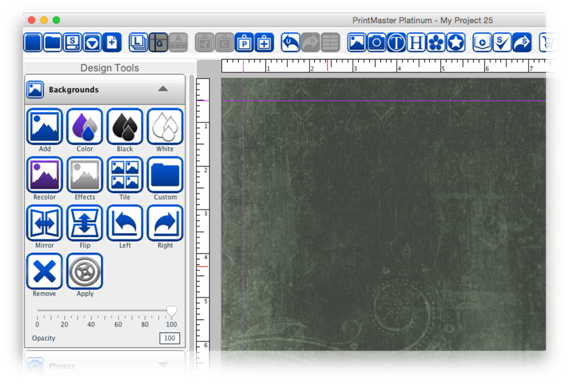
The background serves as the
bottom layer of a page.
Icon
Descriptions.
Add
– Select a background paper to add your page.
Color
– Select a color to apply to as your background.
Black
– Set the background color to black.
White
– Set the background color to white.
Recolor
– Recolor the currently applied background image.
Effects
– Apply an effect to the current background image.
Tile
– Makes smaller repeating tile pattern of the current background image.
Custom
– Select an image file from your computer to use as a background.
Mirror
–Flip the background horizontally.
Flip
– Flip the background vertically.
Left
– Rotate the background image 90 degrees to the left.
Right
– Rotate the background image 90 degrees to the right.
Remove
– Deletes the current background.
Apply
– Applies the current background to all other pages in the project.
Opacity
– Drag the slider left or right to increase or decrease the background
transparency.
·
You can set the background to be a color, paper, or image.
·
Projects start with a transparent checkered background, if
you add objects to your page and export it as a PNG the exported image will
only display the page objects added because the background is transparent.
·
If you export your page as JPG or PDF and have not set a
background it will default to a white background.
Adding
Backgrounds.
1.
Select a page.
2.
Open the Backgrounds tab in the Design Tools panel.
3.
Click on the Add icon.
4.
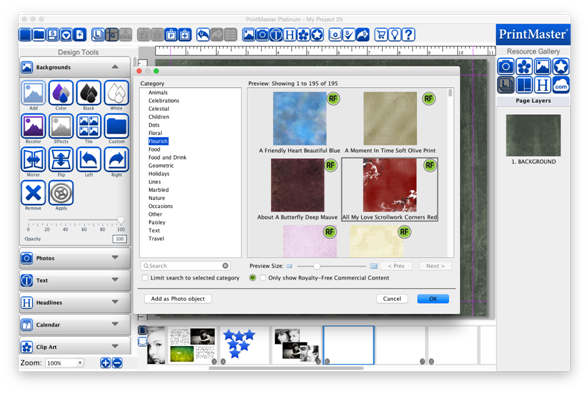
Choose a paper by selecting a category, then select one of
the preview images and click Ok.
5.
This will apply the selected background to the current page.
·
Adding a background as a photo object allows you size,
position, and layer the background just like a photo.
Adding
Custom Backgrounds.
1.
Select a page.
2.
Open the Backgrounds tab in the Design Tools panel.
3.
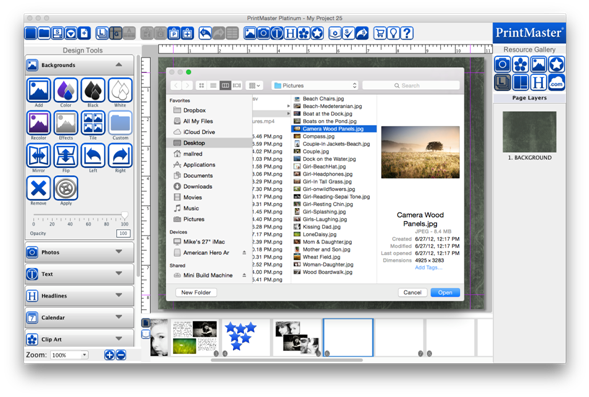
Click on the Custom icon.
4.
Select an image from your computer then click Ok.
Add
a Background Color.
1.
Select a Page.
2.
Open the Backgrounds tab in the Design Tools panel.
3.
Click on the Color icon.
4.
Use the color palette to select a color, then click Ok.
Related Topics